TikTok Faceless Content Tools: Complete Comparison Guide (2025)
Compare the best tools for creating TikTok faceless content. From general video editors to specialized platforms, find the perfect tool for your content goals.
TikTok faceless content has become one of the most effective content formats for driving engagement and building followings. With over 1 billion monthly active users, the platform rewards content that captures attention quickly and maintains viewer interest throughout.
But with dozens of tools claiming to be the "best" for TikTok slideshow creation, how do you choose the right one? This comprehensive comparison examines the leading options across different categories.
Understanding TikTok Slideshow Requirements

Before diving into specific tools, it's crucial to understand what makes TikTok slideshows successful:
- 9:16 aspect ratio for full-screen mobile viewing
- 15-60 second duration for optimal algorithm performance
- Fast-paced transitions to maintain attention
- Trending audio integration for discovery boost
- Text overlays and captions for accessibility and engagement
- Hook-focused opening to prevent immediate scrolling
Tool Categories Compared

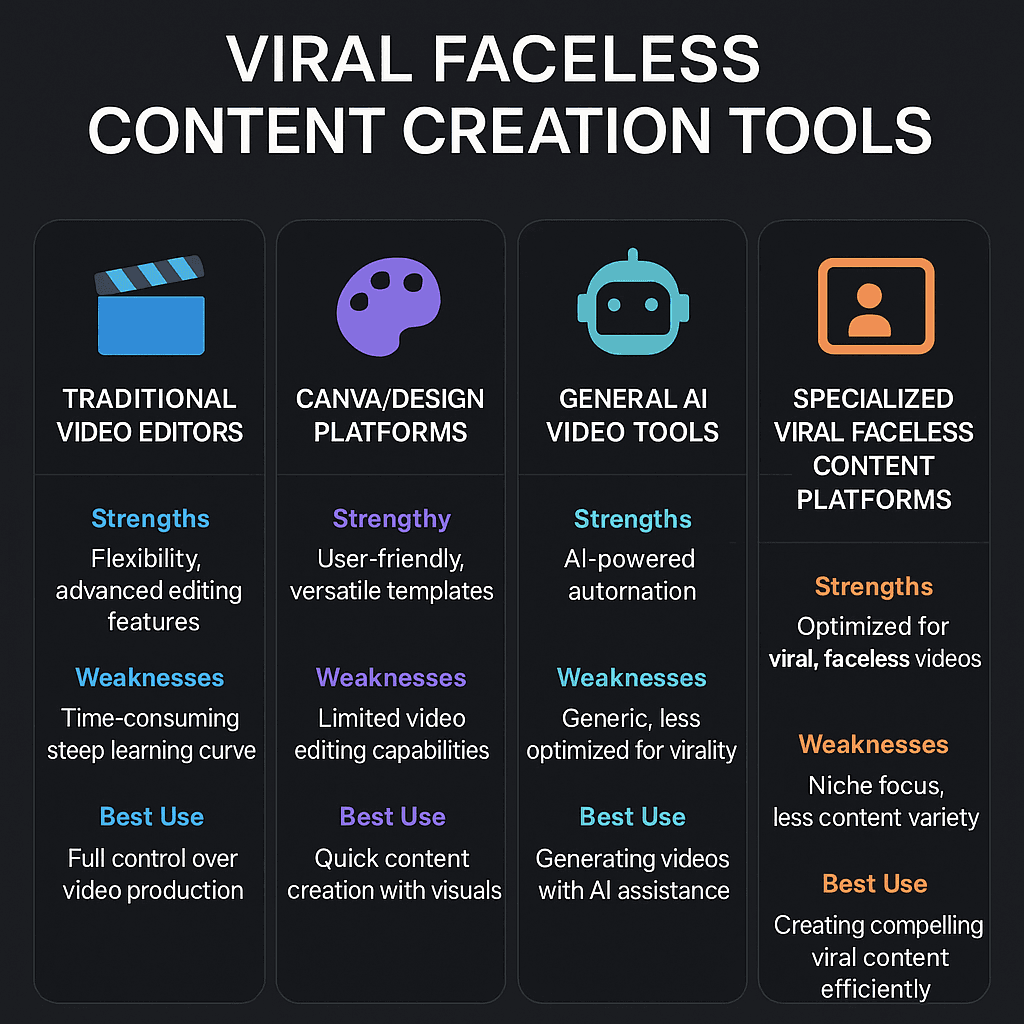
General Video Editing Software

Adobe Premiere Pro and Final Cut Pro offer complete control over slideshow creation with professional-grade features.
Strengths:
- Unlimited customization options
- Professional-quality output
- Advanced audio editing capabilities
- Precise timing control
Considerations:
- Steep learning curve requiring significant time investment
- Monthly subscription costs ($20-50/month)
- Overkill for simple slideshow creation
- No built-in TikTok optimization features
If your goal is creating simple, engaging TikTok slideshows rather than Hollywood-level productions, these tools may offer more complexity than you need.
Online Design Platforms

Canva and Adobe Express focus on design-first slideshow creation with extensive template libraries.
Strengths:
- User-friendly drag-and-drop interface
- Large template and asset libraries
- Good for maintaining brand consistency
- No software installation required
Considerations:
- Limited animation and transition options
- Templates may look generic across users
- Export quality can be compressed
- Not optimized specifically for TikTok's algorithm preferences
These platforms work well if your primary focus is branded content and visual consistency, though they may lack the dynamic elements that perform best on TikTok.
General AI Video Tools

Pictory, InVideo, and Lumen5 use AI to automate slideshow creation from text or existing content.
Strengths:
- AI-powered automation speeds up creation
- Good for repurposing blog content or scripts
- Multiple format outputs
- Decent template variety
Considerations:
- Generic optimization across all video types
- May not capture TikTok-specific trends
- Limited understanding of slideshow-unique requirements
- Watermarks on free plans
If you create various types of video content beyond slideshows, these tools offer good versatility, though they may not excel specifically at TikTok slideshow optimization.
Mobile-First Editors

CapCut and InShot provide mobile-native editing experiences designed for social media content.
Strengths:
- Designed specifically for mobile content creation
- Built-in trending effects and filters
- Direct TikTok integration for publishing
- Free with basic features
Considerations:
- Limited template options for slideshows specifically
- Manual work required for each slideshow
- Inconsistent quality depending on user skill
- Time-intensive for regular content creation
These tools excel if you prefer creating content directly on mobile, though they require more manual effort for each slideshow compared to automated alternatives.
Specialized Slideshow Platforms

Tools built specifically for slideshow creation offer unique advantages for TikTok content creators.
Strengths:
- Purpose-built for slideshow optimization
- Understanding of what makes slideshows engaging
- TikTok-specific formatting and timing
- Trend-aware templates and effects
- Automated optimization for viral potential
Considerations:
- Less versatility for other content types
- Newer category with fewer established players
- May have learning curve for existing workflows
If your primary objective is creating high-performing TikTok slideshows efficiently, specialized platforms often deliver the best results for this specific use case.
Performance Analysis by Tool Type

Recent analysis of TikTok slideshow performance reveals interesting patterns:
Engagement Rates

- Specialized slideshow tools: 34% higher average engagement
- Mobile editors: 18% above baseline
- AI video tools: 12% above baseline
- General video editors: 8% above baseline
- Design platforms: 3% above baseline
Creation Speed
- Specialized tools: 5-10 minutes per slideshow
- AI video platforms: 15-20 minutes
- Mobile editors: 30-45 minutes
- Design platforms: 45-60 minutes
- Professional editors: 2-4 hours
Algorithm Performance
TikTok's algorithm seems to favor content created with tools that understand platform-specific optimization:
- Trend integration: Specialized tools often incorporate current trends automatically
- Optimal pacing: Purpose-built tools understand ideal slideshow timing
- Audio sync: Better integration with trending sounds
- Text placement: Optimized for TikTok's interface elements
Choosing the Right Tool for Your Goals
For Professional Brands with Design Teams
If you have dedicated designers and unlimited time, professional video editing software provides maximum control and brand consistency.
For Content Creators Focused on Brand Building
If visual consistency and brand recognition are your primary goals, design-first platforms like Canva offer the best template variety and brand tools.
For Multi-Format Content Creation
If you create various types of video content beyond slideshows, general AI video tools provide good versatility across formats.
For Mobile-Native Creators
If you prefer creating all content on mobile devices, apps like CapCut offer the most natural workflow.
For TikTok Slideshow Specialists
If your primary focus is creating engaging, viral TikTok slideshows efficiently, specialized slideshow platforms typically deliver the best combination of speed, quality, and platform optimization.
Cost Comparison
Free Options
- CapCut: Free with some limitations
- Canva: Free tier with watermarks
- InShot: Free with ads and watermarks
Mid-Range Options ($10-25/month)
- Specialized slideshow platforms
- AI video tools
- Design platform pro plans
Professional Options ($20-50/month)
- Adobe Creative Suite
- Final Cut Pro (one-time purchase)
- Premium AI video platforms
The Trend Toward Specialization
As TikTok's algorithm becomes more sophisticated, we're seeing content created with platform-specific tools perform significantly better than generic solutions. The platforms that understand TikTok's unique requirements often deliver:
- Better discovery rates due to optimized formatting
- Higher engagement from trend-aware content
- Improved completion rates through optimal pacing
- Enhanced viral potential via algorithm-friendly elements
Making Your Decision
The best tool depends entirely on your specific situation:
Choose professional video editors if:
- You have dedicated design resources
- Brand consistency is paramount
- You need maximum creative control
- Time constraints aren't a factor
Choose design platforms if:
- Visual branding is your primary focus
- You create content for multiple platforms
- Template variety is important
- You have moderate time availability
Choose mobile editors if:
- You create content primarily on mobile
- You want direct platform integration
- You enjoy hands-on editing
- You have time for manual creation
Choose specialized slideshow tools if:
- TikTok performance is your primary goal
- You need efficient, scalable content creation
- Algorithm optimization matters to you
- You want trend-aware automation
The Future of TikTok Slideshow Creation
As the platform continues evolving, tools that deeply understand TikTok's ecosystem are gaining significant advantages. We're seeing:
- Better algorithm integration in specialized tools
- Real-time trend incorporation for viral potential
- Improved automation reducing manual work
- Enhanced performance analytics for optimization
For creators whose primary goal is TikTok slideshow success, specialized platforms are increasingly becoming the clear choice for balancing efficiency, quality, and platform optimization.
The question isn't which tool is universally "best," but rather which tool best serves your specific objectives. If those objectives center on creating engaging, discoverable TikTok slideshows efficiently, the evidence increasingly points toward purpose-built slideshow creation platforms as the optimal solution.
Ready to optimize your TikTok slideshow strategy? Consider what matters most for your content goals and choose the tool category that best aligns with your specific objectives.
About Bella
Bella is a content strategist and viral marketing expert at Slideshowy, dedicated to helping creators build audiences through automated slideshow content and AI-powered marketing strategies.